In your editor
Three things, and you can have the first two in under a minute:
- Colour — headings, slots, blocks, everything
- A live preview beside the document, updating as you type
- Mistakes underlined where they are, with the reason
VS Code
 main.bx
 shop.bmx
 Card.sbmxreceipt.bmx
.bmx file in the explorer, beside its two siblings. The extension registers the icon
itself —
contributes.languages[0].icon points VS Code at file-icon.png for both
themes — so this is the file your editor loads, at the 16px box a row gives it. The rows around the
icons are drawn here; only the icons are the shipped assets.
Download bmx.vsix from the
repository and install it:
code --install-extension bmx.vsix
Open any .bmx file. That is the whole setup — no compiler, no toolchain, nothing to configure.
The preview
Press Ctrl+K V (Cmd+K V on a Mac), or click the preview icon in the editor’s title bar.
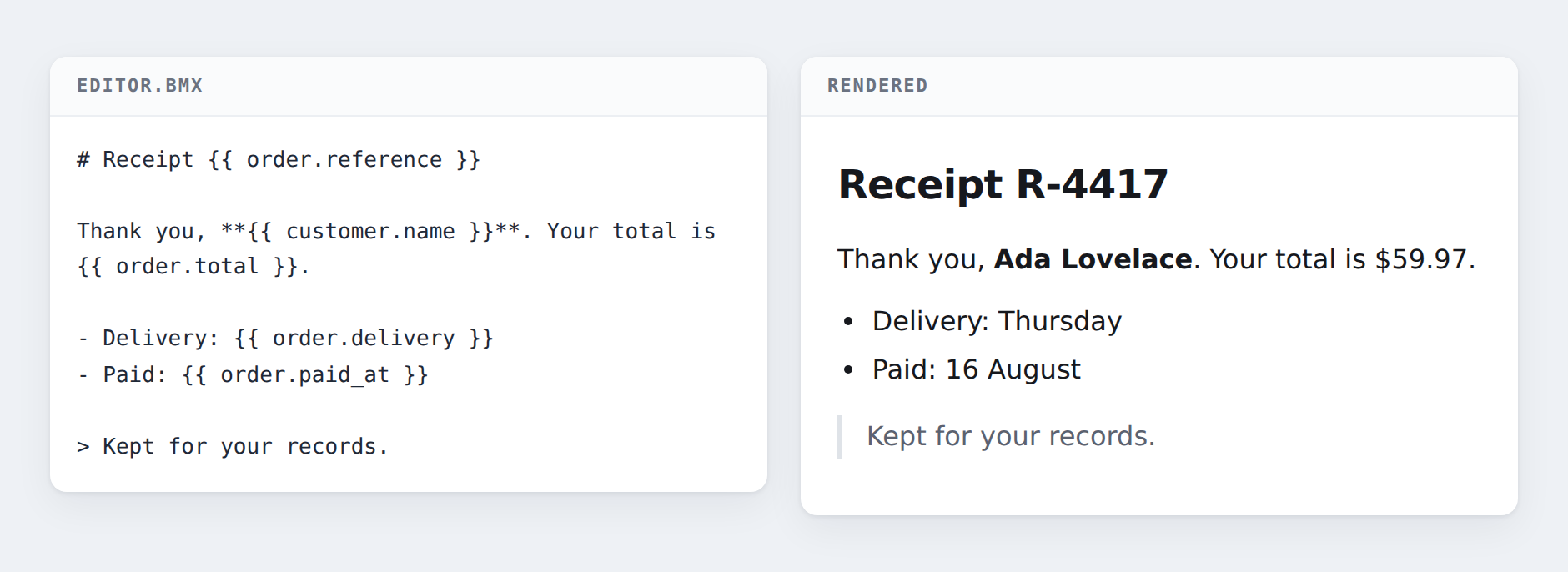
The page appears beside your document and repaints as you type. It uses the same renderer a real page uses, so what you see is what you get.
Give it values for your slots in your settings, and they appear in the preview:
"bmx.preview.bindings": {
  "customer.name": "Ada Lovelace",
  "order.total": "£59.97"
}
Two things the preview will refuse, and both are the point rather than a limitation:
A slot with no value shows the error, not a blank. An empty space is how a page ships with a missing total nobody notices, so the preview says which slot and where instead of quietly leaving a gap.
A :name: block is refused by name. A block is a component, and what card looks like is decided
by whatever renders your page — the preview is not that, so it says so rather than guessing. To see
a page with components in it, render it with your framework.
Mistakes as you type
A problem is underlined where it is, with the reason and a code:
BMX-E002   unterminated strong
BMX-W001   a heading jumps from level 1 to 3 within this document
Red for a refusal — the document will not render until you fix it. Yellow for a warning — it renders fine and is probably still a mistake. When it refuses lists every one with the input that causes it.
Helix
Colour comes from Helix’s own grammar support; diagnostics come from the language server, which needs
Node and nothing else. Add to ~/.config/helix/languages.toml:
[language-server.bmx-lsp]
command = "/path/to/bmx-lsp"

[[language]]
name = "bmx"
scope = "text.bmx"
file-types = ["bmx"]
language-servers = ["bmx-lsp"]
Neovim
git clone https://github.com/andrecorugda/bmx ~/bmx
Then source
editors/nvim/bmx.lua, or copy
it into your config. It sets the filetype and starts the language server, and needs no plugin manager.
Any other editor
The language server speaks ordinary LSP over stdio:
burxt build editors/lsp/bmx-lsp.bx -o bmx-lsp && ./bmx-lsp
It reports refusals and warnings, and deliberately nothing else — no completion, no hover, no formatting. Each of those needs to know what a block means, and BMX does not: your framework declares which blocks exist and what they do. So those belong to your framework’s own server, which publishes them alongside these rather than instead of them.
Building a framework on BMX?
The pieces above are designed to be extended without patching anything.
Your grammar injects into three named scopes to colour your own language inside a slot or a block’s head, and your server publishes its own diagnostics beside BMX’s. Both are described in Building on BMX, with a worked example.