Styling the output
BMX emits plain semantic HTML with one hook. There are no utility classes, no wrapper divs, no generated identifiers — so any CSS you already have works, and Tailwind, SCSS or a stylesheet you wrote by hand all attach the same way.
What you get
Every document renders inside one element:
<article class="bmx"> … </article>
That is the only class BMX adds. Everything inside is the tag the construct means:
| You write | You get |
|---|---|
# Heading |
<h1> … <h6> |
| a paragraph | <p> |
- item |
<ul><li> |
1. item |
<ol><li> |
> quoted |
<blockquote> |
| ` ```burxt ` | <pre><code class="language-burxt"> |
*emphasis* |
<em> |
**strong** |
<strong> |
`code` |
<code> |
[text](target) |
<a href="target"> |
{{ slot }} |
the escaped value, as text |
A slot produces no element. Its value lands as text wherever the slot was, so a slot inside a
heading is part of the heading and inherits its styling. There is no <span class="slot"> to
target, deliberately — a hook there would make styling depend on where a value came from rather
than on what it is.
Plain CSS
Descendant selectors on the one class:
.bmx h1        { font-size: 2rem; line-height: 1.2; }
.bmx p         { margin-block: 1em; }
.bmx blockquote{ border-inline-start: 3px solid #ddd; padding-inline-start: 1em; }
.bmx pre       { overflow-x: auto; }
.bmx a         { text-decoration-thickness: .08em; }
Because the markup is semantic, a classless stylesheet works with no configuration at all —
point one at .bmx and a document is styled.
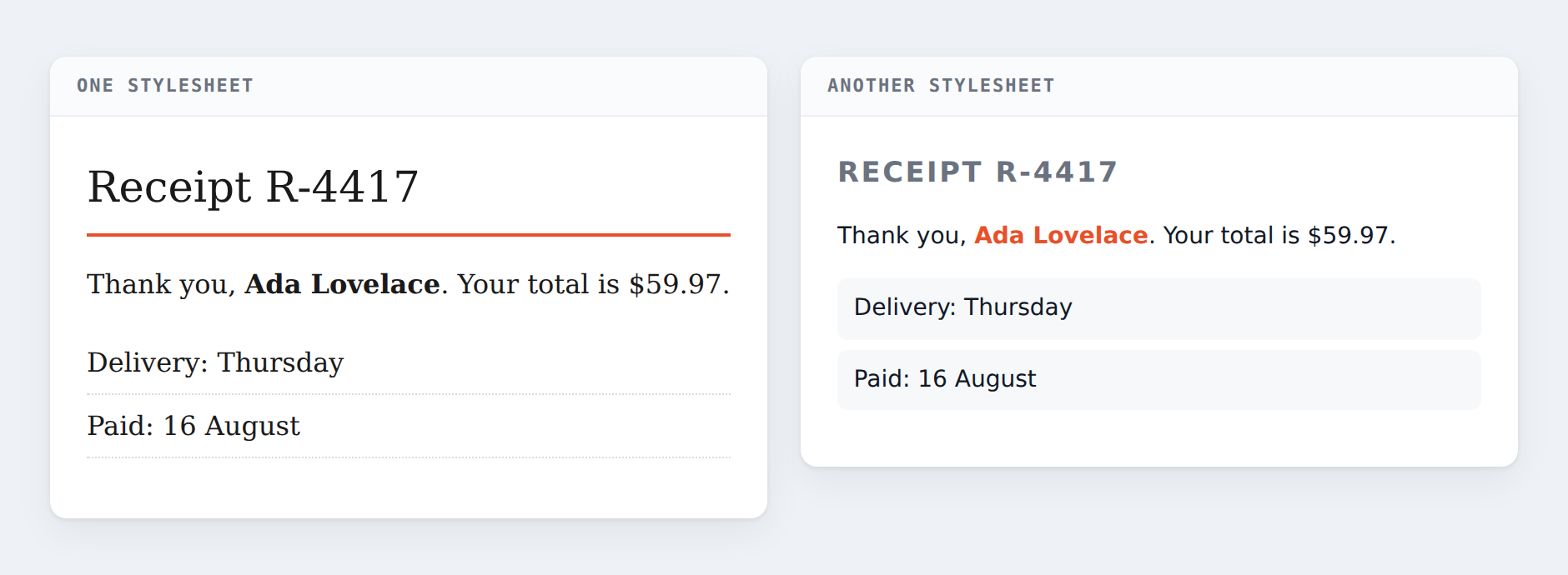
.bmx file changed — which is what it buys you to keep presentation out of it.Tailwind
Tailwind styles elements by class, and BMX emits none — which is exactly what
@tailwindcss/typography is for:
<article class="bmx prose prose-slate dark:prose-invert max-w-none"> … </article>
Two ways to get that second class onto the element:
- Wrap it. Put the rendered document inside a
<div class="prose">. Nothing to configure. -
Style
.bmxdirectly, so the document needs no extra class:@import "tailwindcss"; .bmx { @apply prose prose-slate dark:prose-invert max-w-none; }
One integration note: Tailwind’s JIT finds class names by scanning your source files. It has
no reason to look at .bmx files, and if you ever put a utility class in a slot value it will not
find it. Either add the glob:
content: ["./src/**/*.{html,js}", "./views/**/*.bmx"],
…or, better, keep utility classes out of documents entirely. A document that carries styling is a document you cannot restyle.
SCSS
Nesting maps onto the structure directly:
.bmx {
  h1, h2, h3 { font-weight: 650; }
  p + p      { margin-block-start: 1em; }
  pre        { background: $code-bg; }
  code       { font-family: $mono; }

  // code inside a paragraph, not inside a block
  p code     { padding: .15em .35em; border-radius: 3px; }
}
Syntax highlighting
A fenced block’s info string becomes class="language-<info>", which is the convention Prism,
highlight.js and Shiki all read. Nothing else is needed:
```burxt
let price: Decimal<2> = 19.99;
```
→ <pre><code class="language-burxt">let price: Decimal<2> = 19.99;\n</code></pre>
Note the escaping: the < in Decimal<2> is < in the output, as it must be. Highlighters
read the text content, so this is correct rather than a problem — but if you write your own
highlighting pass, read textContent and not innerHTML.
The info string is checked as a name before it becomes a class, so a document cannot inject an attribute through it.
Putting a class on something
A block takes classes and an id in its head:
:card: .featured .wide #plans
  Any **markdown** in here.
:!card:
At most one #id — a second is an error, because an id is an address and two of them leaves “where
is it” with no answer.
What you still cannot do is put a class on a paragraph or a heading. There is no {: .class}
attribute syntax and there will not be one. That is deliberate, and the reason is worth stating
because it explains why the block form is the answer instead:
The moment ordinary prose can carry presentation, documents stop being restylable — every one of them has to be revisited when the design changes.
A .featured class on a component is different in kind. It is a hook on something whose meaning
the host already declared, and the host decides what featured does. A .featured on a random
paragraph is a decoration the document is now responsible for forever.
So: if a block genuinely needs different treatment, it is a component — and composing two of them is ordinary code rather than a templating feature.
A whole page, bar included
You do not need a host template to get a navigation bar. The front page is one .bmx file and
a stylesheet — brand, links, search box, Sign in, Basket, product cards, call to action — and no HTML
anywhere. The first two lines are the bar:
# Roast&Co

[Coffee](/coffee) [Kit](/kit) [Brewing](/brewing) [Search](/search) [Sign in](/signin) [Basket · 2](/basket)
A bar is a brand and a row of links, and both of those are ordinary markdown. Because there is no attribute syntax, the stylesheet reaches them by position:
.bmx > h1               { float: left }        /* the brand */
.bmx > p:first-of-type  { overflow: hidden }   /* the links beside it */
.bmx > p:first-of-type a:last-child { background: #E8502A; color: #fff }   /* the basket button */
Counting from the end for the buttons (:last-child, :nth-last-child(2)) means adding a navigation
link does not move them.
The honest caveat: a positional selector is brittle. Insert a paragraph above the bar and the whole
thing restyles, because :first-of-type now points at prose. That is exactly what a block fixes —
:nav: names the region, and the selector stops depending on where the region happens to sit:
:nav: .bar
  - [Coffee](/coffee)
  - [Kit](/kit)
:!nav:
A block emits nothing on its own, so this needs a host that declares nav — the level-1 renderer
refuses it with BMX-R003 rather than guessing. Positional CSS is the version that works with no
framework at all; a named block is the version that survives editing.
What the host owns
A block emits nothing by itself, so what :card: .featured becomes is entirely the host’s
decision — including whether those classes reach the output at all. burxt/bmx.bx’s level-1 renderer
declares no blocks and refuses them; a framework like star-burxt declares them and decides their
markup.
That means the class you write in a document is a request, not an instruction, and a host that does not recognise a component refuses rather than guessing. See Building on BMX.